Plan the show flow.
Create the running order.
Start the show.

With ShowDeck your cue sheet is created right inside the software that also runs it — no more switching between Word document, Excel spreadsheet and cue software.

Made in Germany
One-time purchase, no subscription
Windows & macOS
Integrated:
Art-Net / DMX
MIDI
Yamaha DM3
OSC

Planning a show flow — across three different tools

Most teams plan their show flow in one document and run it in another. That costs time and creates mistakes.

Cue sheet on paper — not executable

The run sheet is on a piece of paper or in a Word file — execution happens elsewhere. Scene order misread under stress, last-minute notes illegible, and after the rehearsal the list no longer matches.

Running order and tech — separate worlds

A spreadsheet for the timing, audio software for the playbacks, a lighting program for the DMX values. If something in the flow changes, every tool has to be adjusted individually — and a mistake always creeps in somewhere.

Spontaneous changes — entered manually everywhere

The director swaps two scenes just before the rehearsal. Now: update the running order in Excel, adjust the cue order in the audio tool, re-sort the lighting plan — all by hand, across three different programs, under time pressure.

Performer on a lit stage — professional show production with a precise flow Photo via Unsplash — free to use

ShowDeck: plan the show flow
and run it directly

Your cue sheet and your control software are the same program — what you plan, ShowDeck runs directly.

1

The show flow is the show — directly executable

In ShowDeck you build your show flow exactly as it runs on stage — in acts, scenes and groups. Every point in the flow is an executable cue. What you plan is what you play: no transferring between a planning document and an execution tool.

  • Structure cues into acts and scenes
  • Every cue: individual name and colour
  • Audio, MIDI and light combined in one cue
  • No switching between planning and execution layers
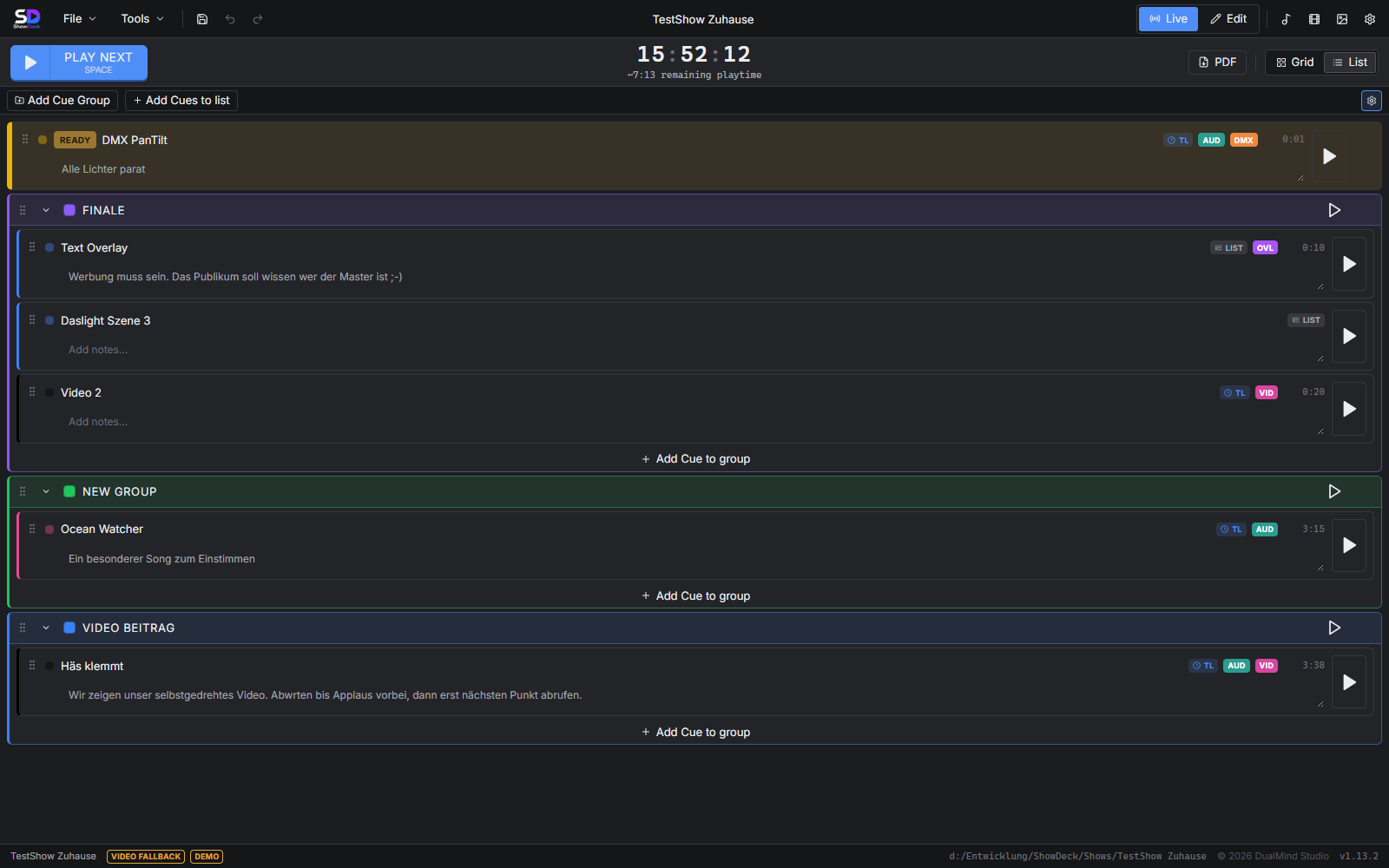
ShowDeck list view: show flow with cues structured by acts and scenes
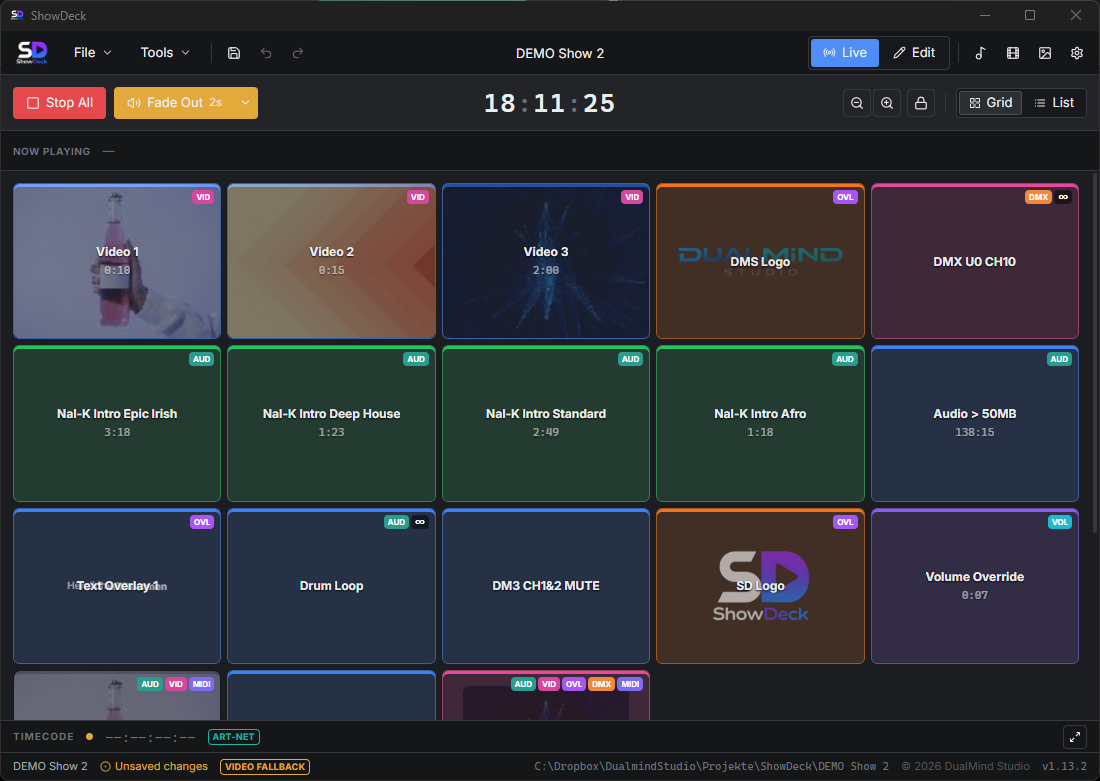
ShowDeck grid view: running order of all cues in live mode
2

The digital running order — always in view

ShowDeck's list view is your digital running order: all cues in the right order, organised by groups, with type and status at a glance. Stage managers and technicians always see what comes next — even in the dark, even under stress.

  • Complete running order in the list view
  • Cue type recognisable at a glance (audio, MIDI, light)
  • Active cues light up in colour in live mode
  • Grid view for quick access under stress
3

Change once — no more double maintenance

Rename a scene, move a cue to another group, adjust the order: in ShowDeck you maintain your show flow in a single place. All linked actions — audio, MIDI, DMX — are executed automatically along with it. No manual re-entry across multiple files and tools.

  • Rename and re-sort cues at any time
  • Freely create and move groups (acts/scenes)
  • Changes take effect immediately on the next trigger
  • One source of truth — no synchronisation effort
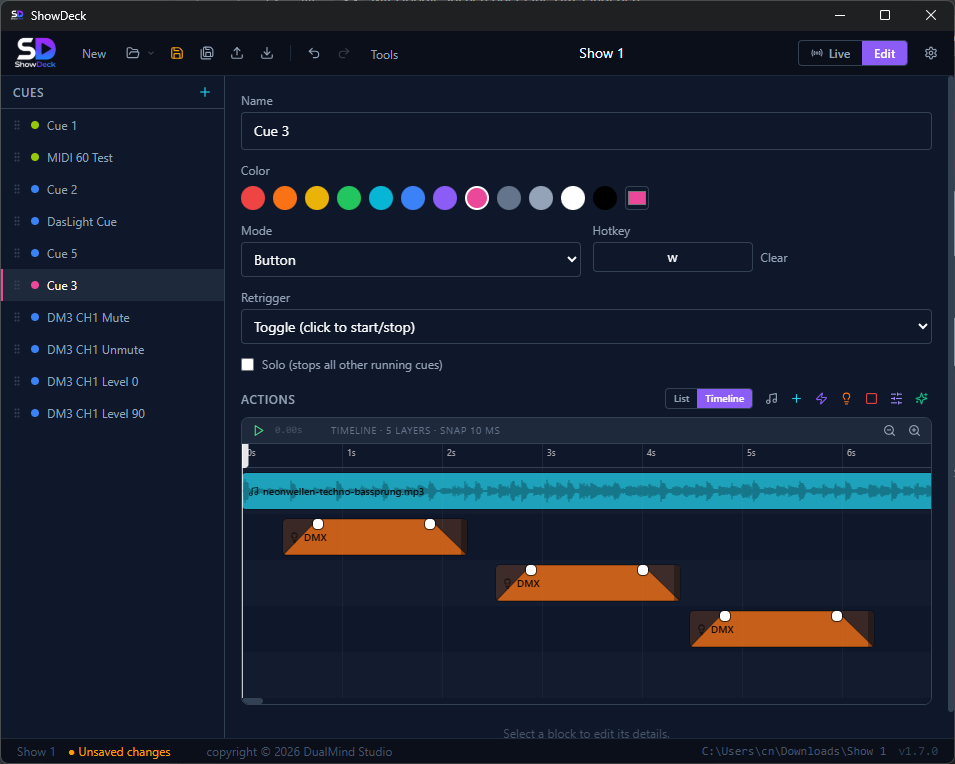
ShowDeck timeline editor: plan the show flow with audio and MIDI to the millisecond

Everything a professional
show flow needs

From the first scene to the closing cue — ShowDeck gives you all the tools to plan your flow precisely and run it reliably.

Digital cue sheet

Create your cue sheet directly in ShowDeck — with cue numbers, names, types and descriptions. Every entry is executable, not just documented.

Acts & scenes structure

Structure cues into any number of groups. Whether a play, gala or concert — the flow in ShowDeck mirrors your show's dramaturgy exactly.

Timeline editor

For cues with precise timing: align audio, MIDI and DMX events on the timeline to the millisecond — ideal for galas and choreographed shows.

Running order at a glance

The grid view shows all cues as large, colourful buttons — perfect for live operation. The list view is your complete digital running order.

Multi-action cues

A single cue can start audio, send MIDI, set DMX and control the mixer at the same time. What belongs together dramaturgically lives in one cue — with no coordination effort.

Hotkeys for the show flow

Assign an individual key to every cue in the flow. Lightning-fast access even when the director changes the order on the fly — without a mouse, without delay.

Plan the show flow
and control it live

Every view in ShowDeck is built for use on set — clear, fast, reliable.

ShowDeck list view: complete running order ordered by acts and scenes

The list view is your digital running order — all cues in show order, organised by groups

ShowDeck grid view: cue buttons for live operation during the show

Grid view in live mode — large, colourful buttons for quick access under stress

ShowDeck timeline: synchronise the show flow with audio and MIDI events to the millisecond

Timeline editor: align audio, MIDI and DMX events for precise show moments

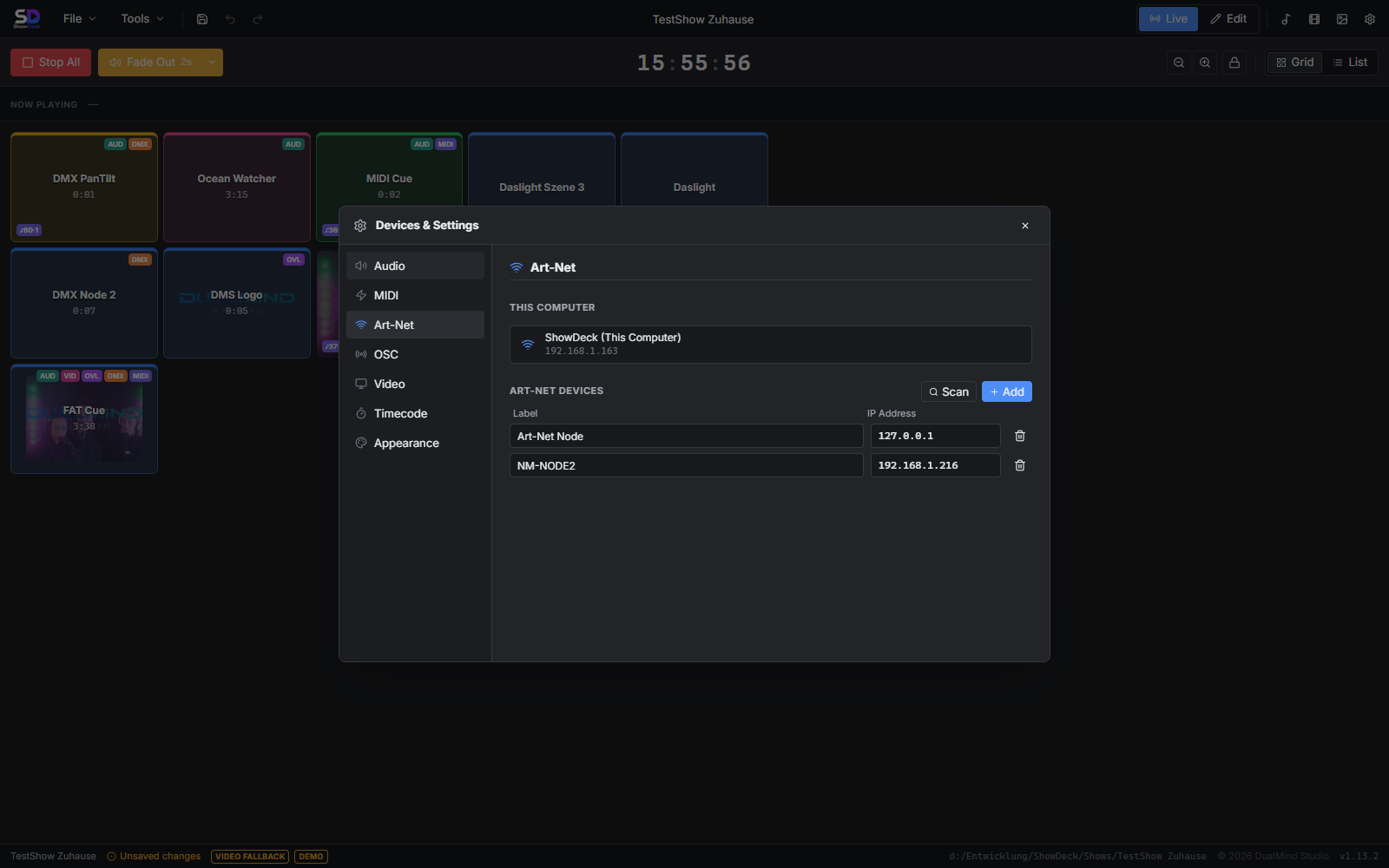
ShowDeck Device Manager: configure audio, MIDI, Art-Net and Yamaha DM3 for the show flow

Device manager: configure all technical components for the show flow in one place

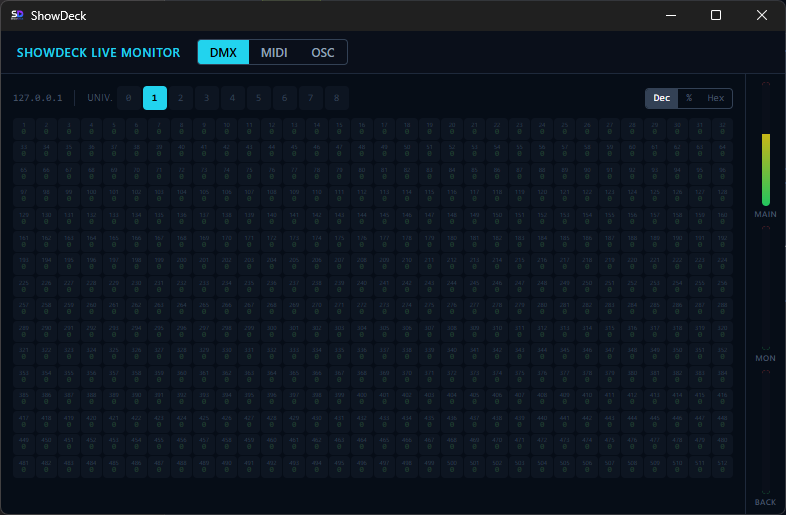
ShowDeck Live Monitor: monitor DMX, MIDI and OSC in real time during the show

Live Monitor: track DMX, MIDI and OSC in real time during the show flow

From planning
to premiere

1

Build the show flow in ShowDeck

Create scenes and acts as groups, create and name cues. Configure audio files, MIDI commands and light scenes per cue — the run sheet is created directly as an executable show.

2

Rehearse — running order always current

If the flow changes, the cue is adjusted in ShowDeck — done. No parallel maintenance in Word or Excel. Stage managers and technicians always see the current running order in the list view.

3

Premiere — one click, the show runs

In live mode every cue starts exactly what was planned — audio, MIDI and light at the same time. No coordinating between tools, no checking a piece of paper. The show runs as planned.

Notebook with pen — preparing the show flow and running order for an event Photo via Unsplash — free to use

Buy once.
Use forever.

No subscription, no monthly costs. ShowDeck is yours — for every production to come.

Lifetime License
$149

incl. 19 % VAT — one-time payment

  • Cue sheet & running order directly in the software
  • Audio, MIDI, DMX and light in one cue
  • Acts & scenes structure, timeline editor included
  • Windows 10/11 & macOS
  • No subscription, no hidden costs
Buy now — $149

Instant download after purchase — for Windows & macOS

Try it first → free download

Questions about
show flow planning

The key answers about cue sheets, running orders and show planning with ShowDeck.

What is a cue sheet and how do I create one in ShowDeck?

A cue sheet is a structured list of all the technical actions of a show — audio, light, MIDI, effects — in the order they are executed. In ShowDeck you create your cue sheet directly in the software: add a cue, choose type and actions, structure it into scenes and acts. The cue sheet is both your run sheet and your control layer — no separate document needed.

What is the difference between a cue sheet and a running order?

A running order describes the timing of an event at programme-item level — e.g. welcome, act 1, interval, act 2. A cue sheet goes deeper: it lists every single technical action with type, trigger and action. In ShowDeck, groups form the running order and cues within the groups form the detailed cue sheet — both in one program.

How do I structure my show flow into acts and scenes?

In ShowDeck you organise cues into groups — a group corresponds to an act, a scene or a programme item. Groups can be named freely. The list view then shows your complete show flow organised by your structure — like a digital, directly executable cue sheet.

Can I change my show flow on the fly?

Yes. Cues can be renamed, re-sorted and moved to other groups at any time. Changes to the flow take effect immediately — the next time the cue is triggered, everything runs according to the updated configuration. No manual re-entry across multiple tools or documents.

Which events is ShowDeck suitable for?

ShowDeck is suitable for all events with technical cues: theatre and musical productions, concerts, galas, corporate presentations, corporate events, fashion shows and live shows of any kind. Wherever audio, light and MIDI are used in a coordinated way, ShowDeck saves time and prevents mistakes.

How does ShowDeck differ from Excel for the show flow?

Excel is a planning document — it describes the flow but does not run it. ShowDeck is both at once: run sheet and control software. What you create in ShowDeck you trigger with a single click — no switching between planning document and execution tool, no duplicate data maintenance, no synchronisation errors.

Is there a user manual?

Yes. The complete user manual explains every function in detail — from setup and creating cues to live operation. To the user manual →